
Photo mosaics are the best-known way to turn a picture into bricks, and many people know them from LEGO® mosaic portrait sets. A 3D custom brick set is a different thing.
LEGO® is a trademark of the LEGO Group, which does not sponsor, authorize or endorse Nooks. Nooks kits are custom brick sets, not official LEGO® sets.
Search for a way to turn a photo into bricks and two quite different products turn up under the same words. Before you buy, know which one you are getting.
What a brick mosaic is
A mosaic turns your photo into a flat grid of small square or round pieces, like pixels, on a baseplate. Software picks the nearest colour for each square from a limited palette, and you get a chart of where each piece goes. It is hung on a wall like a picture.
Good at: faces seen straight on, high-contrast photos, wall art. Less good at: anything where shape matters more than colour, like a pet's ears or a car's silhouette. And building it is mostly repetitive: row after row of single pieces.
What a 3D brick set is
A 3D set is a model of the subject itself: the dog sitting on the shelf, the couple on the steps, the house with its roof and porch. It is designed from your photo by working out the subject's shape, then building that shape from real parts that connect to each other.

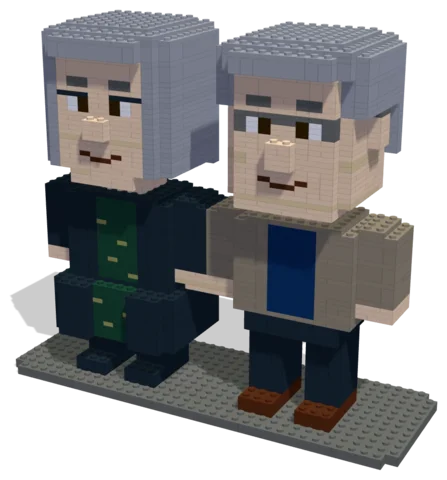 Autumn Walk1,556 parts · 29 × 10 × 25 cmSee the set →

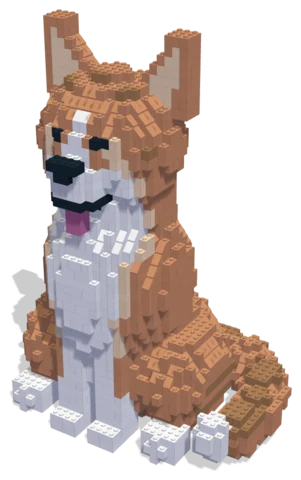 Corgi2,114 parts · 29 × 22 × 42 cmSee the set →

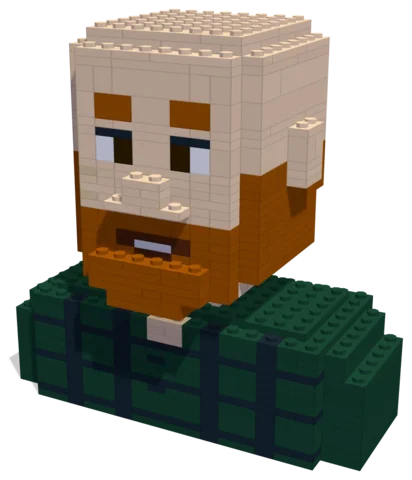 The Ginger Beard696 parts · 16 × 9 × 16 cmSee the set →
Side by side
- Looks like: a mosaic looks like a pixelated version of the photo; a 3D set looks like the subject, stylised.
- Display: a mosaic hangs on a wall; a 3D set sits on a shelf or desk.
- Building: a mosaic is placing tiles on a grid; a 3D set is a step-by-step build of a real structure.
- Design: a mosaic is mostly automatic; a 3D set needs real design work so it stands up and can be built.
- Best subjects: for a mosaic, flat, front-on portraits; for a 3D set, pets, couples, houses and vehicles.
Which one should you choose?
Go for a mosaic if what you want is wall art from a portrait. Go for a 3D set if you want something that feels like the thing itself, particularly a pet, a place or a moment with people in it, and if building it is part of the gift.
Nooks makes 3D sets. You can open our demos in 3D on the Nooks homepage to see what that looks like before you decide.
Design with your agent
Connect a compatible agent through the connection guide. Bring a clear photo and describe the details, size and parts budget you want. Your agent can work on the same project you open in the Nooks workbench.
Preview and check
Inspect the model from several angles, review its validation results, and ask your agent to revise it. A design still needs your review before you source parts and build it.
Your manual and parts list
Export the digital step-by-step manual, parts list and BrickLink wanted list from the workbench. The manual follows the saved design; keep the exports together so the parts and steps match.
Estimate and buy parts
Upload the wanted list to BrickLink to check seller prices, availability, shipping and taxes.
Download the wanted-list XML and upload it to BrickLink to choose sellers and buy parts directly. Nooks provides the digital design tools.
Questions
Can I start with my own photo?
Yes. Bring a photo to your connected agent and describe the build you want. You can preview and edit its design in the workbench.
What do I get?
A digital design, building instructions and a parts list you can export. Buy physical parts separately from independent sellers.
Where can I check parts prices?
Upload the wanted list to BrickLink and review seller prices, shipping and taxes before buying.
Is Nooks affiliated with the LEGO Group?
No. Nooks is independent and is not affiliated with, sponsored or endorsed by the LEGO Group. LEGO® is a trademark of the LEGO Group.